Shorts Maker: Create Engaging Short Videos for YouTube, TikTok, and Instagram
Short-form videos have become one of the most popular ways to share content, attract audiences, and grow on social media. Platforms such as YouTube, TikTok, and Instagram allow creators to reach millions of viewers through short, engaging videos. However, creating professional-looking content requires the right tools. This is where a Shorts Maker becomes useful.
A Shorts Maker is a video creation and editing tool that helps users produce eye-catching short videos without requiring advanced editing experience. Whether you are a beginner, content creator, business owner, or social media marketer, the right video editing software can make the entire process faster and easier.
In this guide, we will explore how Shorts Maker tools work, their important features, benefits, and practical tips for creating better short-form videos.
What Is a Shorts Maker?
A Shorts Maker is an application or online video editing tool designed to create short-form videos for social media platforms. It allows users to combine video clips, images, music, text, transitions, and visual effects into a single video.
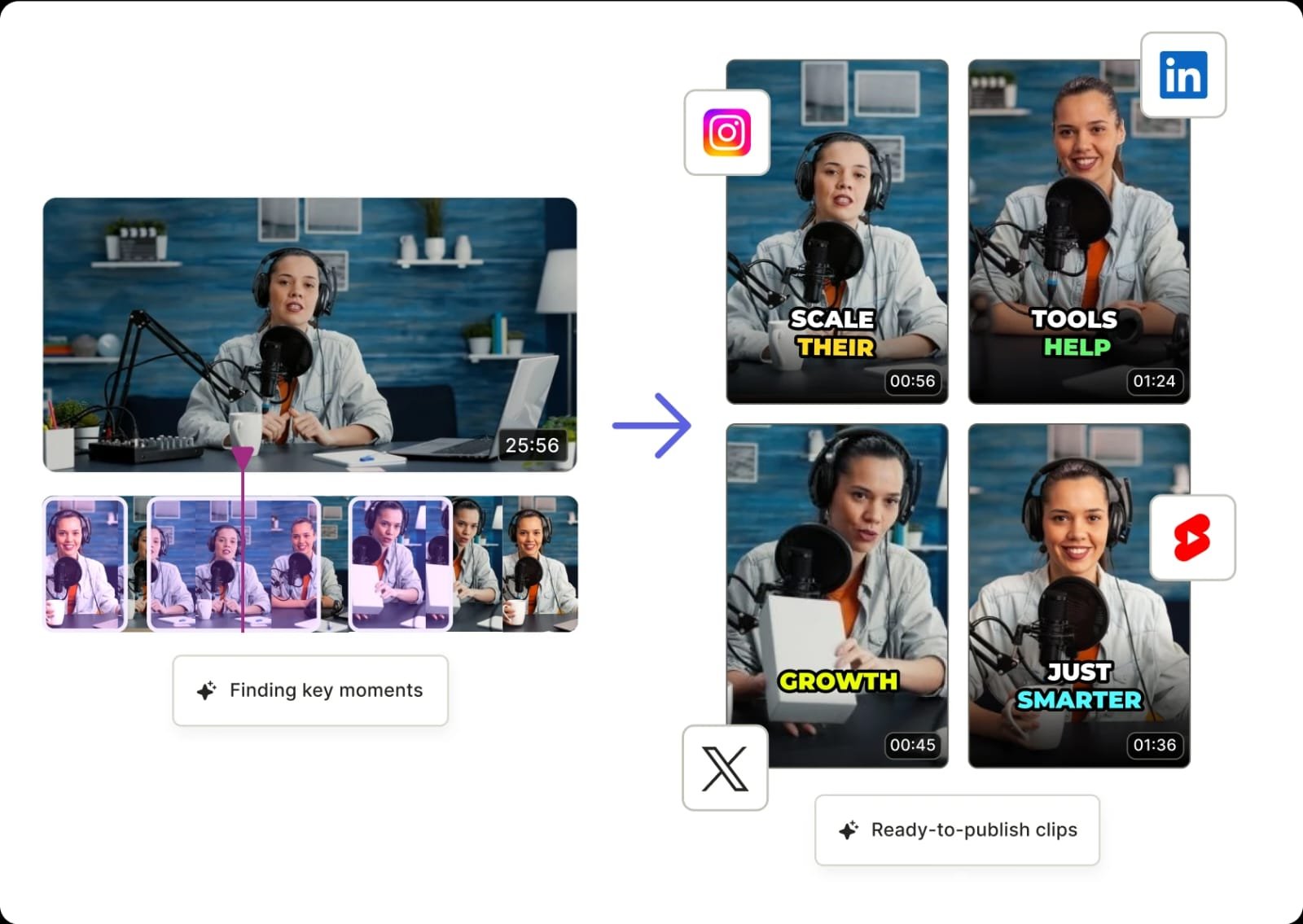
Many modern Shorts Maker applications also include AI-powered features that simplify editing. For example, some tools can automatically generate captions, remove backgrounds, adjust video dimensions, and suggest suitable templates.
These tools are especially useful for creating:
- YouTube Shorts and educational videos.
- Instagram Reels and promotional content.
- TikTok videos and entertainment clips.
- Product advertisements and business promotions.
- Motivational videos and inspirational quotes.
- Travel videos and personal memories.
Important Features of a Shorts Maker
Not every video editing application offers the same capabilities. Before choosing a tool, consider the following features.
1. Easy-to-Use Video Editing
A good Shorts Maker should provide a simple editing interface. Users should be able to trim clips, rearrange scenes, adjust video speed, and combine multiple recordings without complicated steps.
Drag-and-drop editing and ready-made templates can make video production easier, particularly for beginners.
2. AI-Powered Video Creation
Artificial intelligence is changing how people create digital content. Some modern video editors offer AI features that help automate repetitive editing tasks.
Depending on the application, these features may include automatic subtitles, text-to-video generation, background removal, and smart scene selection.
AI tools can save time, allowing creators to focus more on storytelling and content quality.
3. Music and Sound Effects
Audio plays an important role in short-form videos. Background music, voiceovers, and sound effects can make ordinary clips more interesting.
Look for a Shorts Maker that provides audio editing options and access to properly licensed music. Always check the licensing conditions before using music in commercial or monetized videos.
4. Professional Effects and Transitions
Visual effects and transitions help videos look more polished. Popular options include zoom effects, slow motion, cinematic filters, animated text, and smooth scene transitions.
However, using too many effects can distract viewers. Choose transitions that support the message rather than overpower it.
5. HD and Vertical Video Export
Most short-form platforms are designed for vertical video.
A useful Shorts Maker should support a 9:16 aspect ratio and offer high-quality export options, such as 1080p where available.
Clear visuals and correctly formatted videos provide a better viewing experience on mobile devices.
Benefits of Using a Shorts Maker
Using dedicated short-video editing software offers several advantages.
Saves time: Ready-made templates and automated editing features reduce the time required to create videos.
Beginner-friendly: You do not need professional editing experience to produce attractive content.
Supports creativity: Filters, animations, music, captions, and effects provide different ways to present ideas.
Improves consistency: Reusable templates help creators maintain a recognizable visual style across multiple videos.
Supports business marketing: Businesses can create product demonstrations, advertisements, tutorials, and promotional videos for social media campaigns.
How to Create a Professional Short Video
Creating an engaging video involves more than adding effects. Follow these practical steps to improve your results.
Step 1: Choose an Interesting Topic
Start with an idea that offers entertainment, education, or useful information. Examples include quick tutorials, technology tips, product demonstrations, and interesting facts.
Step 2: Record or Import Your Clips
Use a smartphone camera or import existing video files. Record in good lighting and keep your subject clearly visible.
Step 3: Edit Your Video
Open your Shorts Maker and arrange your clips in the correct order. Remove unnecessary scenes, adjust the timing, and add smooth transitions.
Step 4: Add Captions and Music
Use readable captions to communicate your message, especially because many people watch videos without sound. Add suitable background music without making it louder than the main audio.
Step 5: Export and Publish
Export your video in a suitable vertical format. Before publishing, check the video quality, spelling, audio levels, and platform requirements.
How to Choose the Best Shorts Maker
Choosing the right video editor depends on your goals and budget.
Consider these factors before installing or purchasing an application:
- Pricing: Compare free features with paid subscription plans.
- Watermarks: Check whether the free version adds a watermark.
- Editing tools: Look for trimming, captions, transitions, and audio controls.
- AI capabilities: Consider whether automated editing features are useful for your workflow.
- Export quality: Make sure the application supports suitable video resolution.
- Privacy: Review app permissions and privacy policies before uploading personal or business videos.
Popular options include CapCut, Canva, InShot, and Adobe Express. Each offers different editing capabilities, templates, and pricing arrangements.
Tips to Get More Views on Short Videos
Creating a video is only the beginning. To improve its performance, focus on the viewer experience.
- Capture attention quickly: Make the opening seconds interesting.
- Keep content focused: Communicate one main idea per video.
- Use clear captions: Make important information easy to understand.
- Create original content: Avoid simply copying other creators.
- Maintain good quality: Use clear visuals and balanced audio.
- Publish consistently: Develop a realistic posting schedule.
- Study analytics: Review audience retention, engagement, and viewing patterns to understand what works.
Remember that views are not guaranteed. Strong storytelling, useful information, and consistent improvement are more valuable than relying on editing effects alone.
Conclusion
A Shorts Maker is a valuable tool for anyone interested in creating engaging short-form videos for YouTube, TikTok, Instagram, and other social media platforms. With features such as AI-powered editing, automatic captions, music integration, creative transitions, and vertical video export, these applications make video production more accessible.
Download
Whether you are building a personal brand, promoting a business, or sharing entertaining content, choosing the right editing software can improve your workflow and help you produce professional-looking videos. Start with simple ideas, experiment with different editing techniques, and focus on creating content that provides genuine value to your audience.